Bring your team together
Organize programs, build teams, assign leaders, and manage role-based access as your ministry grows.
 Literature EvangelismTHE APP FOR YOUR MISSION
✳ YOUR CALLING. CONNECTED.
From the first door to the next follow-up. Bring your territory, people, and everyday details together—so you can focus on sharing hope.
For organization programs. For personal canvassing. For the mission.
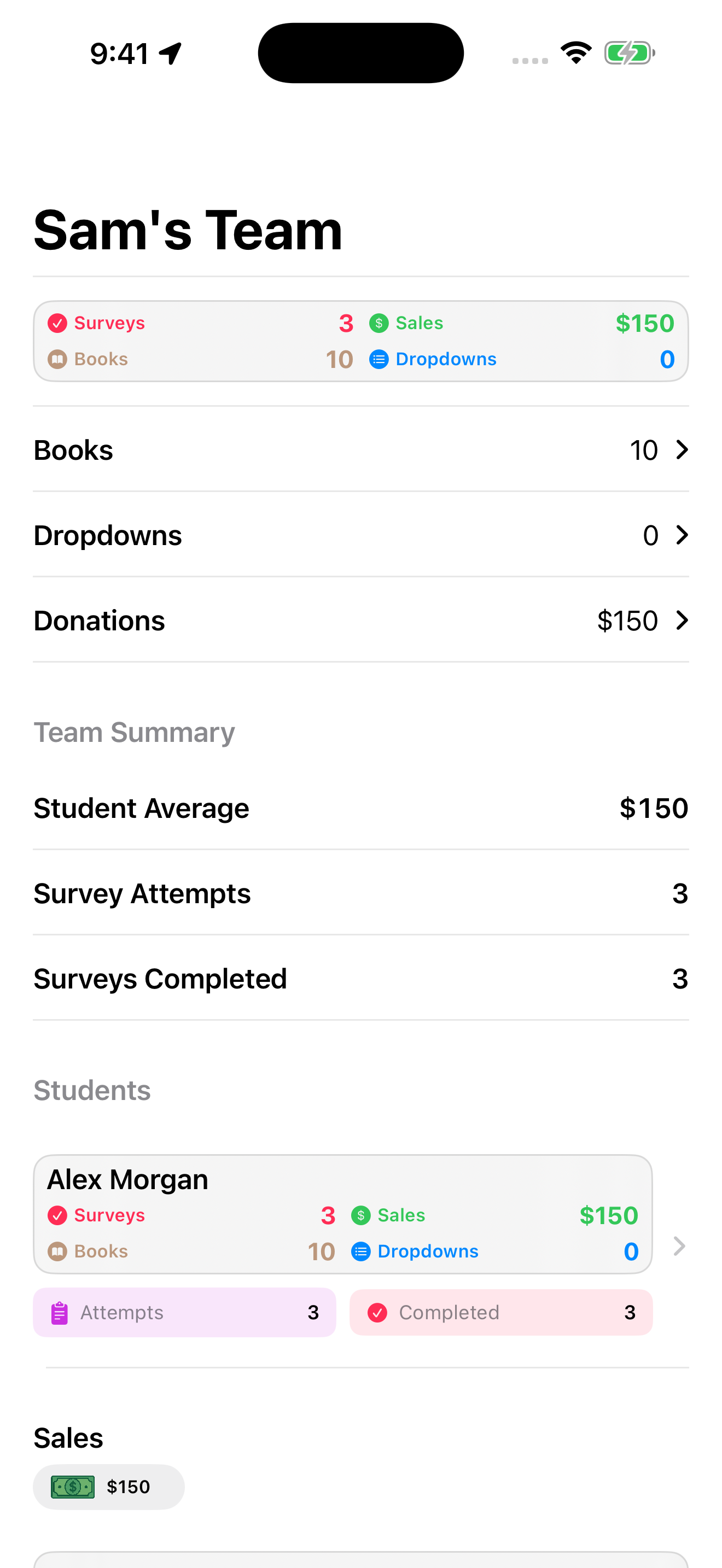
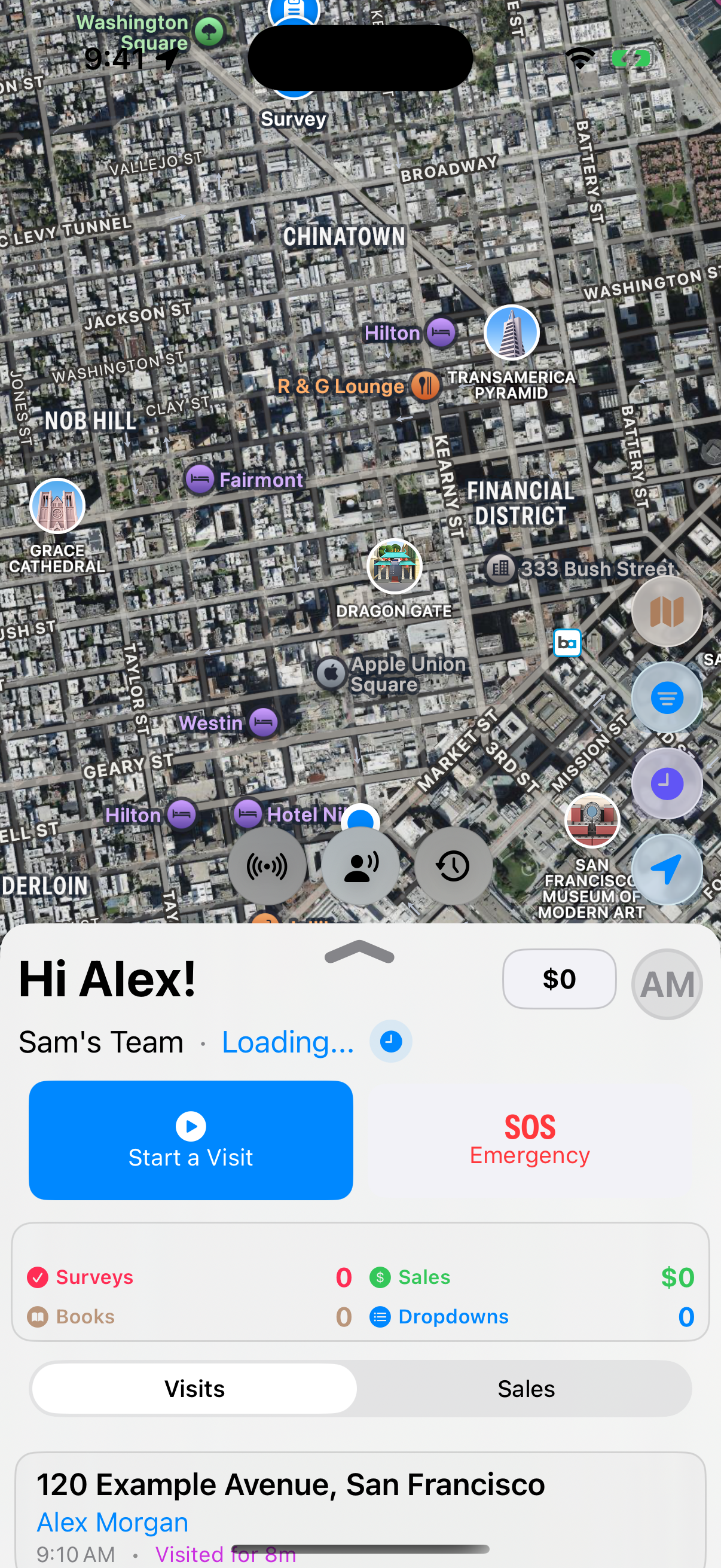
Actual iOS screens · Fictional demo data
One purpose. Every part of the work.
FROM PLANNING TO FOLLOW-UP
One connected place for the details that make a day in the field possible. Take a closer look.
Create territories, divide the work, and prepare drop plans before the day begins. See where your teams are working and how coverage is taking shape.
Edited iOS screenshot · Fictional demo identity
SHORT, GUIDED TOURS
Choose the tour for your role. Follow along with real app screens and practical guidance for your day in the field.
Videos and screenshots are in English.
3–5 minutes · Narrated by Caleb · Visible captions
Record visits, collect payments with Square Tap to Pay, capture interests, review your progress, and get help when you need it.
FOR CONFERENCES & ORGANIZATIONS
Support the people doing the work. Give program heads and leaders a clearer picture of the field, and your conference or organization a more organized view of the details.
Start your free trial Make the app your ownOrganize programs, build teams, assign leaders, and manage role-based access as your ministry grows.
Review territory coverage, team activity, and program results. Give each day a thoughtful plan.
Bring sales, donations, books, hours, and inventory into a clearer view of your program.
LESS END-OF-PAY-PERIOD SCRAMBLE
Review time entries, prepare compensation summaries, account for deductions, and export a CSV for your organization’s payroll process.
Payroll preparation tools; payroll disbursement is handled separately.MAKE IT YOURS
Give your team an app that feels like home. Rebrand your organization’s workspace with your own logo, name, and colors, while keeping the literature evangelism tools your team relies on.
Branding examples from the app’s built-in presets.




A FAMILIAR LOOK FOR YOUR TEAM
In the web admin, open Settings and select the edit button beside your organization.
Sign in to customizeUnder Organization Brand, choose a Brand preset such as Youth Rush, Youth Summit, HHES, LEAD, or SOULS West. Choose Custom for your own identity.
Upload your organization’s logo, set your brand name and display name, and choose your primary and secondary colors.
Customize receipt branding and choose an available app icon, then save your organization settings.
Your uploaded logo brands supported in-app and web views. Phone home-screen icons use the app’s available bundled designs; uploading a logo does not create a new home-screen icon.
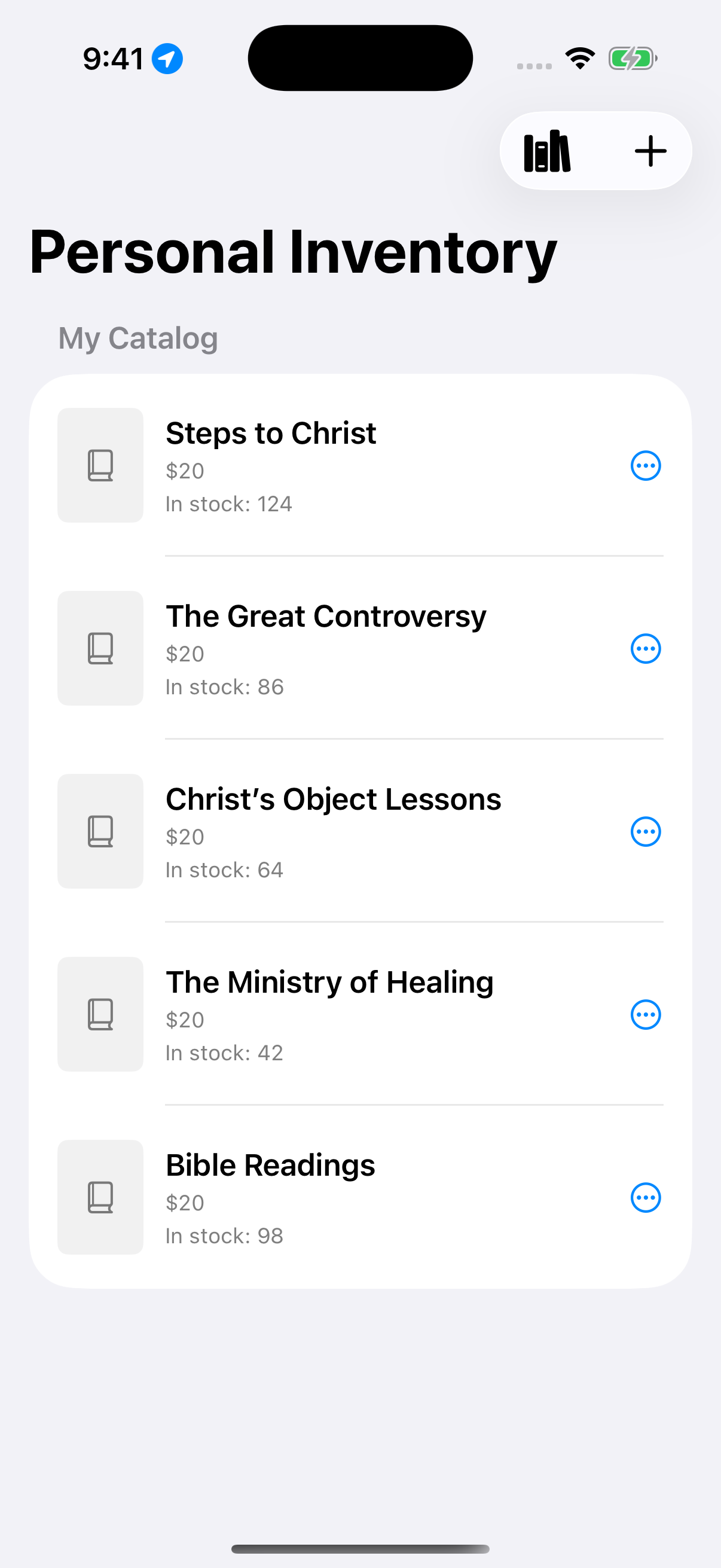
Personal catalog on iOS · Demo books
FOR INDIVIDUAL CANVASSERS
You don’t need a full program to do meaningful work. Personal canvassing mode gives you a place to plan, record, and reflect on your own ministry.
THE DETAILS MAKE A DIFFERENCE
Record survey responses, prayer requests, interest ratings, and notes that give the next conversation context.
Track field hours and visit timing. Program time entries support review and payroll preparation.
Record books, donations, and payment details. Supported Square connections add payment collection and receipt tools.
Help alerts, pickup requests, and supported team radio tools keep coordination close at hand. Location tools depend on permissions and connectivity.
Manage catalogs, review stock, record restocks and removals, and see the history behind inventory changes.
Use organization branding, program settings, and access roles to support the way your team works.
Territories and subterritories · Team assignments · Coverage and historical activity maps · Drop plans and time-block sets · Manual routes and checkpoints · Scouting and drop status · Supported automatic planning and routing
Visit timing, outcomes, prayer and notes · Surveys in English and Spanish · Contacts, interest ratings and follow-up · CSV export · Optional Thrive sending, historical backfill and error review
Sales and donations · Cash, check and supported Square payments · Tap to Pay where supported · Receipt requests · Product catalogs and book library · Restocks, removals and stock history · Payment and sales reporting
Separate personal workspace · Visits, interests, sales and statistics · Custom catalog and favorite books · Territories, plans and manual routes · Canvassing hours · Personal payments and receipts · Organization affiliations and sharing controls
Team location and sharing controls · Help and pickup requests · Territory issue and hazard reports · Team and private radio · Voice-message history and read status · Authorized radio review · Notifications and supported offline recovery
Time clock and meal breaks · Recent workdays · Time corrections, review and approval · Compensation summaries · Deductions · Payroll access roles · CSV export for your payroll process
Student, team and program goals · Daily, weekly and program targets · Workday calendars and target adjustments · Goal progress and planning guidance · Personal bests and team records · Dashboards and analytics
Written drafts and guided prompts · Recording and transcription where enabled · Optional AI drafting and polishing · Source review and clarification questions · Editorial feedback and assignments · Author and guardian releases · Word export and publication tracking
Multiple organizations and programs · Teams and user invitations · Access codes and role permissions · Leader-in-Training support · Program activation · Custom logos, colors, receipts and bundled app icons · Organization enrollment and billing
iPhone and iPad · Android beta: student, leader and personal tools · Browser administration · Apple Watch summaries and visit reminders · Home-screen widgets · Supported Apple Live Activities, radio shortcuts and CarPlay · Language settings and guided tutorials
This inventory covers features in the current app source; it does not mean every feature is released on every device. Availability depends on app version, platform, role, program settings and service setup. The Android beta includes student, leader and personal workflows; a public Google Play release is pending and platform differences remain. Goals, testimony tools, automatic routing and companion features depend on rollout. Recording, transcription, AI and guardian email require enabled services. Stripe payment support remains a staged integration. Payroll tools prepare exports; they do not disburse wages.
FROM YOUR DESK TO THE DOORSTEP
Built for the devices you use in the field, with a browser-based workspace for program administration.
Field tools, leadership views, and personal canvassing in the Apple app.
iOS · iPadOSStudent, leader, and personal canvassing tools, including teams, territory planning, visits, sales, and activity.
BETA · PUBLIC RELEASE PENDINGCompanion views for team and program stats, visit timing, and reminders.
watchOS · COMPANIONProgram management, contacts, reports, inventory, and payroll preparation.
PROGRAM ADMINISTRATIONAll app screenshots shown here are from iOS. Android includes student, leader, and personal workflows and is currently in beta testing, with no public Google Play release yet. Features vary by platform, role, app version, and program settings.
ROOM TO SEE WHAT’S POSSIBLE
Free personal canvassing. One simple annual plan for your organization.
FOR INDIVIDUALS
Your own workspace for the work you’re called to do.
No trial. No subscription. No organization required.
FOR CONFERENCES & ORGANIZATIONS
One annual subscription for your entire organization.
First 30 days free
Organization subscriptions help sustain the app and its continued development. After your 30-day organization trial, we email a $500 USD invoice to the owner. Pay within 30 days by mailed check; no credit card required.
Annual renewal invoices arrive 30 days before your anniversary and are due at renewal. Cancel before your trial ends to prevent the first invoice, or before the next term to stop renewal. Billing questions? literatureministries@cccsda.org
A FEW THINGS YOU MAY BE WONDERING
Yes. Customize your organization’s logo, brand name, colors, and receipt branding from the web admin’s organization settings. Start with a built-in preset or choose Custom. Examples include Youth Rush, Youth Summit, HHES, LEAD, and SOULS West. See branding examples and setup steps.
Yes. Personal canvassing is free for everyone, whether or not your organization subscribes. It provides a separate workspace for your visits, sales, catalog, hours, and activity. Personal canvassing is supported on Apple devices and in the Android beta.
Thrive is the North American Division’s interest management platform for churches and conferences. It helps teams organize contacts, track visits and Bible study requests, and keep follow-up moving. Sending canvassing contacts to Thrive helps local ministry teams continue the conversation after a visit, with a shared record of who needs attention and what comes next.
Program administrators can enable the Thrive integration to send new and updated contacts. The integration uses contact location to help route follow-up and records sending errors for review. Historical contacts can also be sent through the program’s backfill tool. CSV export is available separately; this is not a two-way Thrive sync.
Program administrators can review time entries, correct and approve records, prepare compensation summaries, include deductions, and export a CSV for payroll preparation. The app supports your payroll workflow; it does not disburse wages or replace your payroll provider.
No. The organization plan is $500 per organization annually and includes unlimited programs and unlimited users throughout your organization. Students, leaders, program heads, and organization owners are all included, with no per-program or per-user charges.
After 30 days, your organization receives a $500 annual invoice with 30 days to pay by check. Renewal invoices arrive 30 days before each anniversary. Owners can manage contacts, invoices, and cancellation in Organization billing. Unpaid invoices receive personal follow-up; billing does not automatically shut off access or delete records. Personal canvassing remains free.
No. iPhone, iPad, and the Android beta support field, leadership, and personal workflows, with differences between platforms. Apple Watch provides companion tools, and the web portal supports program administration. Android is in beta testing ahead of a public Google Play release. Availability also depends on your role, app version, and program configuration.
Yes. Select Sign in to open admin.literatureevangelism.app with your existing account and program data. You can also continue using youthrushadmin.org.
Choose your device
Choose the download option for your device.
Available for iPhone and iPad, with Apple Watch companion tools.
Download on the App StoreStudent, leader, and personal tools in beta testing. Requires a Google account already invited to the testing program. Not yet a public Google Play release.
Join Android betaTHE NEXT DOOR IS WAITING
Make space for the conversations that matter.
Get started free